Game Designer | Level Design • Technical Design
I design gameplay spaces and implement interactive systems in Unreal Engine and Unity.
My work combines exploration, encounter pacing, and player progression with hands-on implementation using Blueprints and C#.
Unannouced Survival Horror Project
Single Player
Horror Sequence UE5
Designed and scripted a narrative-driven horror encounter in Unreal Engine 5 using Blueprints.
-
Implemented BP_Text as the dialogue system with temporary characters to build storytelling.
-
Used environmental storytelling such as lighting to guide player progression.
-
Created traversal sequences including squeeze-through spaces to control pacing and build tension.
-
Developed combat encounters featuring enemy AI, weapon acquisition, and player combat interactions.
-
Designed interactive puzzle elements and progression gating through environmental triggers.
-
Implemented dynamic lighting events that react to player actions, including power loss and restoration sequences.
Coop Puzzle UE5
Designed and scripted a coop puzzle that works with an AI companion
-
Implemented BP_Puzzle manager as the system that manages puzzle in any given level.
-
The BP_Puzzle_Manager has variables that are editable at runtime that a designer can set in the details panel.Designed BP_Levers that has different states and works on interact as both a player or AI companion.
-
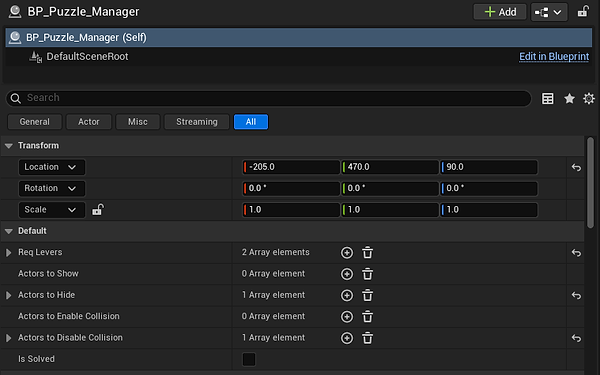
- Req Levers
- This is checking for the levers that are placed in the world. It then will check if the lever state is down.
- Actors to Show
- Depending on your puzzle design, if you want actors to show when you activate the levers, here is where you assign the actor you want to show.
- Actors to Hide
- Depending on your puzzle design, if you want actors to be hidden when you activate the levers, here is where you assign the actor you want to show.
- Actors to Enable Collision
- If you want a mesh or actor to have collision when you activate the levers, here is where you enable its collision.
- Actors to Disable Collision
- If you want a mesh or actor to not have collision when you activate the levers, this is where you would add it so it will be disabled.
- Is Solved
- Bool to check if the puzzle is solved or not

